
What devices can I use the online compass on?
A compass needs a magnetometer, a sensor that measures the Earth's magnetic field. Most phones have one. Computers almost never do.
| Device | Built-in Magnetometer | Works here |
|---|---|---|
| iPhone | Yes, every current model | Yes, after you allow Motion & Orientation access |
| iPad | Varies by model | Usually, but worth checking |
| Android phone | Yes, nearly all | Usually |
| Android tablet | Depends on the model | Sometimes |
| Windows 2-in-1 or tablet | Some | Sometimes |
| Windows laptop | Rarely | Usually not |
| MacBook | No | No |
| Desktop PC | No | No |
If you are using a laptop or desktop computer, the online compass usually will not work on these devices, because the required hardware (a built-in magnetometer) is not present in your device, and no website can make up for a missing sensor. To find out whether your device has a built-in magnetometer, check its full official specifications.
How do I enable compass permissions in Chrome and Safari?
Depending on whether you are using Chrome or Safari, follow the steps below.
Enabling sensors in Chrome (Android)
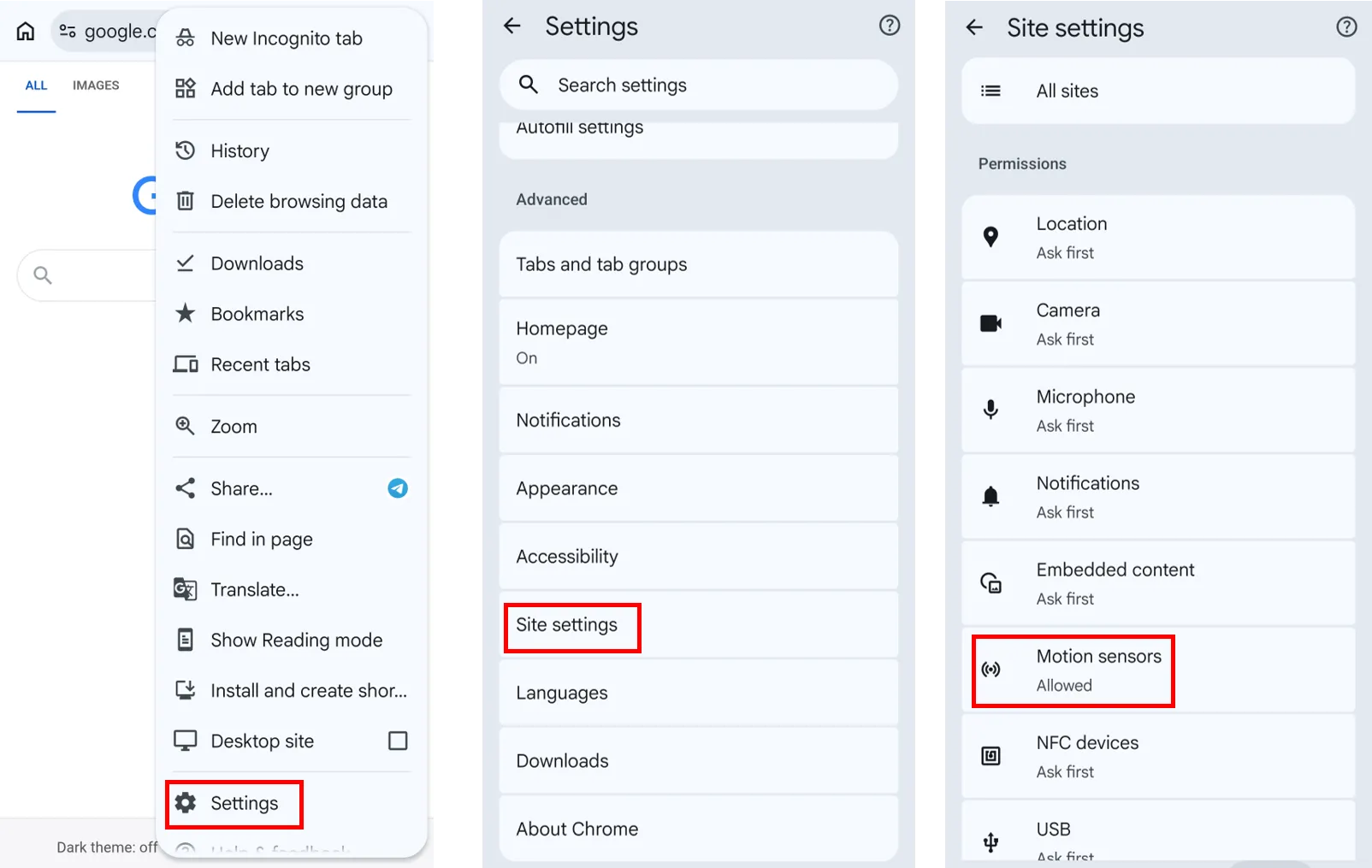
Motion sensors are switched on by default in Chrome, so the compass usually works with no setup at all. If the dial is frozen, check that the permission has not been turned off:
- Open Chrome and tap the three-dot menu in the top right.
- Tap Settings.
- Tap Site settings.
- Tap Motion sensors.
- Make sure it is switched on, then reload this page.
Older guides tell you to enable a flag at chrome://flags/#enable-generic-sensor-extra-classes. That flag was removed from Chrome and no longer exists, so the address will open the Experiments page without finding anything. There is nothing to enable there.
Allowing Motion & Orientation access in Safari (iPhone and iPad)
On iOS 13 and later there is nothing to switch on in advance. Safari asks for permission on the page itself, and the request has to come from something you tap, because the compass is not allowed to start by itself:
- Tap Start compass on this page.
- Safari shows the Motion & Orientation access prompt.
- Tap Allow.
- The compass starts immediately.
If you tapped Don't Allow, reload the page and tap Start compass again.
On iOS 12.1 and earlier there is no prompt: tap Start compass once and the compass starts. On iOS 12.2 to 12.5, the compass will not start until you turn on Motion & Orientation Access in Settings > Safari > Privacy & Security, which is off by default on those versions.
That one tap is the only difference from Android.
Older guides tell you to turn on Motion & Orientation Access in Settings > Safari > Privacy & Security. That switch was removed in iOS 13, so it is not there on current iPhones and iPads. The on-page prompt replaced it.
Note that Macs have no built-in magnetometer, so they will not produce a heading. Open this page on your phone instead.
How accurate is the online compass?
Use an online phone compass for quick bearings. Carry a physical compass for anything where being 15 degrees wrong would matter.
| Instrument | Typical Accuracy |
|---|---|
| Sighting or mirror compass | about 1° to 2° |
| Military lensatic compass | about 2° |
| Baseplate compass | about 2° to 5° |
| Phone, calibrated, away from metal | about 5° to 15° |
| Phone near magnets or metal | completely unreliable, 10° to 180° off |
What are magnetic north, true north and magnetic declination?
True north is the direction toward the geographic North Pole, the point where all meridians (the imaginary lines of longitude running between the poles) converge.
Magnetic north is the horizontal direction of the Earth's magnetic field where you are standing. Your compass does not aim at the magnetic pole; it aligns with the local field lines, and those lines are bent by the geology beneath you and by the uneven shape of the field generated in the Earth's core. In contrast to true north, magnetic north shifts over time as that field changes.
Magnetic declination is the angle between magnetic north and true north (geographic north) at your specific location on Earth. It's called east declination when magnetic north lies east of true north, and west declination when it lies west.
Frequently Asked Questions
What do magnetic heading and true heading mean?
Magnetic heading is the direction you are facing, measured in degrees clockwise from local magnetic north, the direction the magnetic field points where you are standing. True heading is the direction you are facing, measured in degrees clockwise from true north.
Why doesn't my phone show magnetic heading even though I enabled compass sensor permissions?
Some smartphones lack a built-in magnetometer, such as the Samsung Galaxy A07 (4G LTE version). Make sure your phone has a built-in magnetometer.
Why do I have to tap Start compass on my iPhone?
Apple requires a permission request for motion and orientation data to come from a direct user action, so this page cannot ask as it loads. Tap Start compass, tap Allow, and the compass runs normally from then on. Android has no such requirement, which is why it starts on its own.
Why does the magnetic heading point the wrong way?
Remove any magnetic case or wallet, move away from metal, and do the figure-8 calibration. If it is still off by a constant amount, that is declination, not a fault.
Why does the reading jump around?
Interference. Magnetic mounts, speakers, steel furniture and vehicle interiors are the usual causes. Step away and recalibrate.
Why doesn't this compass work on my laptop?
Laptops and desktops almost never include a magnetometer, and MacBooks don't have one. Open this page on your phone.
Does this compass use GPS to find magnetic heading?
No. The magnetic heading comes from your device's built-in magnetometer, combined with the accelerometer to correct for tilt. GPS and other positioning signals are only used if you choose to turn on Location services for coordinates.
Does this compass show true north or magnetic north?
It can show both. By default, with Location services off, it shows magnetic heading. By switching Location services on, it shows true heading as well as magnetic heading.
Is it as accurate as a real compass?
No. A phone is typically within 5 to 15 degrees; a decent baseplate compass is within about 2. Convenience is the trade.
Do you track my location?
Sensor readings are processed in your browser and are never uploaded. If you switch on Location services, your coordinates are sent to our own server, where we calculate your true heading, magnetic declination and elevation. Sunrise and sunset times are fetched from a public API, so your coordinates are passed to that service. We do not store them.
Does this compass work offline?
You need an internet connection to load this page the first time. After that, leave the tab open and your magnetic heading keeps working offline. True heading, declination, place name, elevation and sunrise and sunset times need a connection, so they stop updating. On iPhone, tap Start compass again after a reload. Safari remembers your permission, so no new prompt appears.
What happens if I switch Location services on?
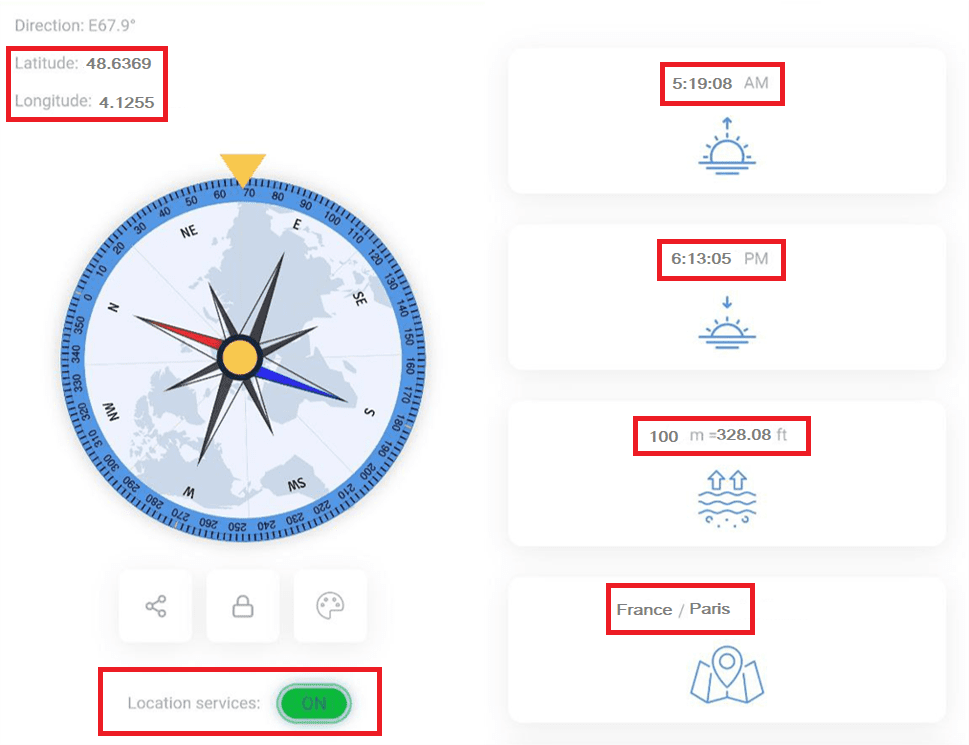
If you switch on Location services, it will show additional information such as your coordinates (latitude and longitude), the location you are in now, true heading, magnetic declination, elevation and sunrise and sunset times.